PacketMoat is reader-supported. When you buy through links on our site, we may earn an affiliate commission at no extra cost to you.
The Intro If you manage a remote team, your biggest liability isn’t your firewall—it’s your employee’s password. In 2025, 82% of corporate breaches involved a human element, usually a stolen credential.
You can spend $5,000 a month on fancy monitoring software, or you can spend $50 once to physically lock the front door.
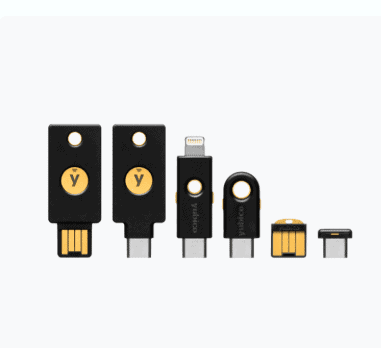
I tested the YubiKey 5 NFC not as a gadget, but as a business asset. My conclusion? It is the single highest-ROI security investment a small business can make. Here is why every employee laptop needs one in the USB port.
Why “Free” 2FA is Costing You Money Most businesses rely on SMS codes or Authenticator apps for 2-Factor Authentication. The problem? They are phishable. If an employee is tricked into typing that code into a fake login page, you are breached.
The YubiKey is different. It requires physical presence. Even if a hacker clones your employee’s SIM card or steals their password, they cannot log in unless they physically steal the key from your employee’s keychain.
- The Math: Average cost of a ransomware cleanup: $182,000.
- The Solution: Cost of a YubiKey 5 NFC: ~$55.
- The Verdict: This isn’t an expense; it’s insurance.
How to Deploy YubiKeys for a Remote Team (Google Workspace)
Many business owners hesitate because they think hardware keys are hard to manage. They aren’t. If you use Google Workspace (Gmail for Business), you can enforce this in minutes.
Purchase in Pairs: Always buy two keys per employee (Primary + Backup).
Enforce 2-Step Verification: Go to your Google Admin Console > Security > Authentication > 2-Step Verification.
The “Any Hardware” Rule: Check the box for “Allow security keys.”
Registration: Have your employees plug in the key and tap the gold contact when prompted during their next login.
Once registered, that account is virtually unhackable from a remote location.
Technical Breakdown: Why the “5 NFC” Series?
As a business owner, you might see cheaper keys on Amazon. Do not buy them for your employees. The YubiKey 5 Series is the industry standard for a reason. Here are the specs that matter for your IT security:
- NFC Capability: This is non-negotiable. It allows employees to tap the key against their company iPhone or Android device to log in remotely. The cheaper “Security Key” series often lacks this.
- Protocol Support: The 5 NFC supports FIDO2, U2F, OTP, and Smart Card protocols. Translation: It works with almost everything—Google Workspace, AWS, Salesforce, and LastPass.
- Durability: These keys are crush-resistant and water-resistant. If an employee drops one in the parking lot or spills coffee on it, it still works.
Common Employee Questions (FAQ) When you hand these out, your team might push back. Here is how to answer them:
“What if I lose my key?” This is why we buy two. You will have a backup key stored in the safe. If you lose your primary key, we revoke its access instantly from the Admin Console and issue you the spare.
“Is this tracking my location?” No. The YubiKey has no battery, no GPS, and no Wi-Fi. It is a passive device that only wakes up when plugged in. It cannot track you.
“Do I have to plug it in every time?” No. You can set up “Trusted Devices” in Google Workspace so you only need to use the key once every 30 days, or when logging in from a new location (like a hotel).
The Verdict: Is it Worth the $55?
If you have a remote team, you cannot afford not to have these. The peace of mind of knowing that a phishing email cannot breach your company is worth ten times the price.
Where to Buy for Business:
Protect your revenue. Lock the door.
Securing your family? Hardware keys protect your accounts, but your kids’ devices need protection too. See our Microsoft Family Safety Setup Guide and TikTok Parental Controls guide.

Tye is a CISSP-certified cybersecurity analyst with over 25 years in IT and 15 years specializing in network defense and threat intelligence. He built PacketMoat to bring enterprise-grade security knowledge to everyday people and small businesses.