PacketMoat is reader-supported. When you buy through links on our site, we may earn an affiliate commission at no extra cost to you.
As a cybersecurity professional, I choose Keeper Password Manager for one specific reason: I don’t want my bank account drained.
That specific fear is exactly why I enjoy using Keeper.
Keeper is what we call a Password Manager. If you are like most people, you can only remember so many passwords. Think about how many websites you log into every week! There are only so many variations of “Password123” you can keep in your head before you start reusing them—and that is where hackers get you.
A password manager solves this by keeping all your credentials in one secure location (a vault) and allowing you to access them from any device. But why did I choose Keeper specifically?
The “Zero Knowledge” Advantage
Here is where Keeper is awesome. They operate on a security model known as Zero Knowledge.
Zero Knowledge is a system that guarantees the highest level of privacy. It means that the encryption (hiding your data) and decryption (unhiding your data) occurs locally on your device.
Why does this matter? It means that not even Keeper’s own employees can see your passwords. If their servers were ever hacked, the attackers would only find useless, scrambled code. Your keys stay with you, on your phone or laptop.
Features That Save Me Time
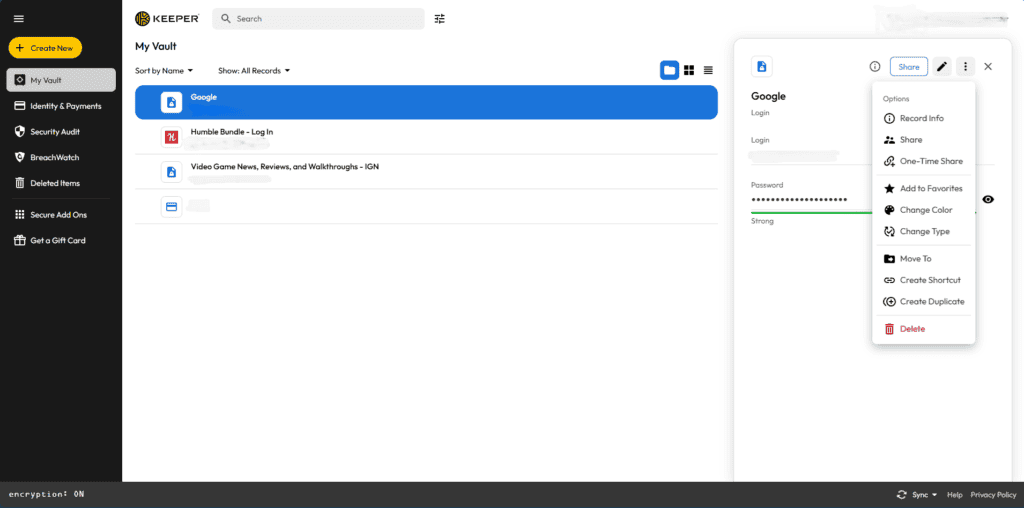
My personal Keeper Vault (sensitive info redacted)
Beyond the encryption, the daily features are why I stick with it. It takes the “chore” out of security. Here are the features I use most:
- Auto-Fill: I never type a username or password anymore. Keeper detects the website and fills it in for me.
- Generator: When I sign up for a new site, Keeper creates a random, complex password (like
9#xP2$mL!) so I don’t have to think of one. - Secure Sharing: If I need to send a password to a family member, I can share it securely through the vault instead of texting it (which is dangerous).
- 2FA Storage: It can store those 6-digit authentication codes, so I don’t have to switch apps to log in.
[ 🔥 Exclusive Deal: Save 30% on Keeper Unlimited ] Stop reusing passwords. Secure your digital life today.
Free vs. Paid: My Verdict
Is the Free Version enough? Honestly, for a teenager? Maybe.
But the Free version limits you to one device. That means if you save a password on your phone, you can’t see it on your laptop. In 2026, that is a dealbreaker.
If you value your time, get the Paid version. It syncs everything instantly. It costs less than a cup of coffee a month to ensure you never get locked out of your life.
Conclusion
If you are still saving passwords in an Excel sheet or a notebook, it is time to upgrade. Whether you choose the free version or the paid version, Keeper offers the peace of mind that only “Zero Knowledge” encryption can provide.
If you want to secure your physical privacy too, check out my guide on finding hidden cameras.

Tye is a CISSP-certified cybersecurity analyst with over 25 years in IT and 15 years specializing in network defense and threat intelligence. He built PacketMoat to bring enterprise-grade security knowledge to everyday people and small businesses.