How to Implement Zero Trust Security for Small Business: A Step-by-Step Guide (2026)
Quick Answer: Implementing zero trust security for small business starts with identity verification (hardware security keys like YubiKey 5 NFC), network segmentation (next-gen firewalls), and enforcing least-privilege access. Most SMBs can deploy a basic zero trust framework in 60-90 days for $5,000-$15,000, with immediate ROI through reduced breach risk and insurance premiums.
This article contains affiliate links. PacketMoat may earn a commission at no extra cost to you when you purchase through these links. This helps support our cybersecurity research and content creation.
Executive Summary: The Business Risk of Trusting Your Network
Traditional perimeter security assumes everything inside your network is safe. That assumption is killing small businesses. When an attacker breaches your firewall—through a phished employee, compromised vendor, or unpatched vulnerability—they have free rein to move laterally across your entire network.
Zero trust security operates on a simple principle: trust nothing, verify everything. Every user, device, and application must prove its identity before accessing resources, regardless of network location. For SMBs, this isn’t paranoia—it’s survival. The average cost of a data breach for small businesses now exceeds $120,000, and 60% of breached SMBs close within six months.
Why SMBs Are Prime Targets for Network-Based Attacks
Cybercriminals target small businesses because they have valuable data (customer records, financial information, intellectual property) but typically lack enterprise-grade security. The 2023 Verizon Data Breach Investigations Report found that 43% of cyberattacks target small businesses, yet only 14% are adequately prepared to defend themselves.
The attack pattern is predictable: compromise one employee account through phishing, use those credentials to access the network, then move laterally to find high-value targets. Traditional perimeter security can’t stop this—once the attacker is inside, they’re trusted by default. The 2022 LastPass breach demonstrated this perfectly: attackers compromised a single DevOps engineer’s home computer, then used that access to eventually reach the company’s production environment.
For SMBs, the risk is amplified by remote work. Your network perimeter now extends to every employee’s home office, coffee shop, and hotel room. Without zero trust controls, each remote connection is a potential entry point.
Step 1: Implement Strong Identity Verification
Zero trust starts with identity. You cannot verify access without first proving who (or what) is requesting it. This means moving beyond passwords to multi-factor authentication (MFA) using hardware security keys.
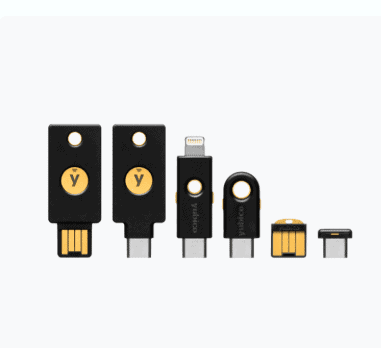
Deploy YubiKey 5 NFC devices to every employee. Unlike SMS-based MFA (which can be intercepted), hardware keys provide phishing-resistant authentication. The YubiKey 5 NFC works with virtually every business application—Microsoft 365, Google Workspace, password managers, VPNs—and costs under $50 per employee. For USB-C devices, consider the YubiKey 5C NFC.
Configure your identity provider (Azure AD, Okta, Google Workspace) to require hardware key authentication for all users. Set conditional access policies that block login attempts from unrecognized devices or suspicious locations. This single step eliminates 99.9% of automated credential stuffing attacks.
For detailed deployment guidance, see our Phishing-Proof Your Remote Team: Why the YubiKey 5 NFC is Mandatory for SMB Security (2026 ROI Guide) which includes ROI calculations and implementation timelines.
Step 2: Deploy Network Segmentation and Microsegmentation
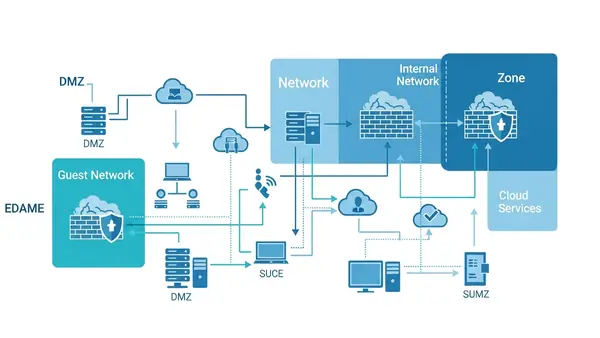
Traditional networks are flat—once you’re in, you can access everything. Zero trust requires segmentation: dividing your network into isolated zones with strict access controls between them.
Start with a next-generation firewall that supports application-level inspection and identity-based policies. For SMBs with 25-100 employees, the Firewalla Gold Plus offers an excellent balance of capability and affordability. It provides VLAN segmentation, intrusion detection, and granular access controls without requiring a dedicated security team.
For businesses with more complex requirements or multiple office locations, the Ubiquiti Dream Machine Pro delivers enterprise-grade features at SMB pricing. It includes built-in controller software for managing multiple sites and supports advanced segmentation policies.
Create separate network segments for: employee workstations, guest WiFi, IoT devices (printers, security cameras), servers, and any industrial/operational technology. Configure firewall rules so that each segment can only access the specific resources it needs. Your reception area printer doesn’t need access to your accounting server.
Step 3: Enforce Least-Privilege Access Controls
Zero trust requires that users and devices receive the minimum access necessary to perform their functions—nothing more. This limits the damage from compromised accounts.
Audit your current access controls. How many employees have admin rights they don’t need? How many service accounts have overly broad permissions? Start by removing local administrator privileges from user workstations. Our guide on Stop Browsing as Administrator: The #1 Security Mistake Windows Users Make explains why this is critical and how to implement it without disrupting productivity.
Implement role-based access control (RBAC) in your core business systems. Define roles based on job functions (sales, accounting, IT, management) and assign permissions to roles rather than individuals. When someone changes positions, you update their role assignment rather than manually adjusting dozens of permissions.
Use a privileged access management (PAM) solution for administrative accounts. These systems require additional authentication before granting elevated privileges and log all administrative actions. For SMBs, cloud-based PAM solutions like CyberArk Endpoint Privilege Manager or BeyondTrust start around $10-15 per user per month.
Step 4: Secure Remote Access with Zero Trust Network Access
Traditional VPNs grant full network access once connected—the opposite of zero trust. Zero Trust Network Access (ZTNA) solutions verify identity and device posture before granting access to specific applications, not the entire network.
For SMBs, cloud-based ZTNA solutions offer the easiest deployment path. Services like Cloudflare Access, Twingate, or Perimeter 81 sit between your users and applications, enforcing identity verification and access policies without requiring complex on-premises infrastructure. Pricing typically ranges from $5-12 per user per month.
Configure your ZTNA solution to check device health before granting access. Is the device running up-to-date antivirus? Is the operating system patched? Is the hard drive encrypted? Devices that fail these checks should be denied access or restricted to a quarantine network until remediated.
Combine ZTNA with a centralized password management solution like those covered in our Best Password Managers for Remote Teams (2026 Review) guide. This ensures remote employees use unique, strong passwords for every application while maintaining zero trust principles.
Step 5: Implement Continuous Monitoring and Verification
Zero trust isn’t “verify once and trust forever”—it’s continuous verification. You need visibility into what’s happening across your network in real-time.
Deploy endpoint detection and response (EDR) software on all devices. Solutions like SentinelOne, CrowdStrike Falcon, or Microsoft Defender for Endpoint monitor for suspicious behavior and can automatically isolate compromised devices. For SMBs, expect to pay $5-15 per endpoint per month.
Implement centralized logging and security information and event management (SIEM). At minimum, collect and retain logs from your firewall, identity provider, servers, and critical applications. Cloud-based SIEM solutions like Devo, Exabeam, or Microsoft Sentinel offer SMB-friendly pricing starting around $1-2 per GB of log data per month.
Set up alerts for suspicious activities: failed login attempts from unusual locations, access to sensitive data outside business hours, lateral movement between network segments, or devices communicating with known malicious IP addresses. Respond to alerts within hours, not days.
Step 6: Protect Data at Rest and in Transit
Zero trust extends to data itself. Encrypt sensitive information both when stored (at rest) and when transmitted (in transit).
For data in transit, enforce TLS 1.3 for all web traffic and require VPN or ZTNA connections for remote access. Disable legacy protocols like SMBv1, FTP, and Telnet that transmit data in cleartext.
For data at rest, enable full-disk encryption on all devices using BitLocker (Windows), FileVault (macOS), or LUKS (Linux). For highly sensitive data that leaves your premises, use encrypted USB drives like the Apricorn Aegis Secure Key 3NXC which features hardware encryption and PIN protection.
Implement data loss prevention (DLP) policies that prevent sensitive information from being emailed to external addresses, uploaded to unauthorized cloud services, or copied to unencrypted removable media. Cloud-based DLP solutions integrate with Microsoft 365 and Google Workspace starting around $3-5 per user per month.
Budget Considerations and ROI Analysis
Implementing zero trust doesn’t require an enterprise budget. A typical 25-person small business can deploy a comprehensive zero trust framework for $10,000-$15,000 in first-year costs, breaking down approximately as:
- Hardware security keys: $1,250 (25 users × $50)
- Next-generation firewall: $2,000-$4,000 (hardware + first-year licensing)
- ZTNA solution: $1,800-$3,600 annually ($6-12 per user per month)
- EDR software: $1,500-$4,500 annually ($5-15 per endpoint per month)
- PAM solution: $3,000-$4,500 annually ($10-15 per user per month)
- Cloud SIEM: $1,200-$2,400 annually (depends on log volume)
- Implementation consulting: $2,000-$5,000 (optional but recommended)
Ongoing annual costs (years 2+) drop to $7,500-$15,000 as you’re only paying software subscriptions and firewall renewals. Compare this to the average SMB data breach cost of $120,000-$200,000, and the ROI is immediate.
Many businesses see additional cost savings through reduced cyber insurance premiums (15-30% discounts for implementing zero trust controls), decreased IT support time (fewer malware incidents), and improved employee productivity (secure remote access enables flexible work arrangements).
Compliance Implications: NIST, SOC 2, and Industry Frameworks
Zero trust architecture aligns with multiple compliance frameworks, making it easier to meet regulatory requirements.
The NIST Cybersecurity Framework explicitly recommends zero trust principles in its “Protect” and “Detect” functions. Implementing the steps above addresses NIST controls PR.AC-4 (access permissions management), PR.AC-7 (authentication and authorization), and DE.CM-7 (monitoring for unauthorized activity).
For businesses pursuing SOC 2 certification, zero trust directly supports the Security principle’s common criteria around access controls (CC6.1-CC6.3), logical and physical access (CC6.6-CC6.7), and system monitoring (CC7.2). Many auditors now expect to see zero trust controls in place.
Industry-specific frameworks also mandate zero trust principles. HIPAA requires access controls and audit trails for protected health information. PCI DSS 4.0 (effective March 2025) explicitly requires multi-factor authentication and network segmentation. CMMC 2.0 for defense contractors includes zero trust as a key security practice at Level 2 and above.
Document your zero trust implementation thoroughly. Maintain network diagrams, access control matrices, and evidence of continuous monitoring. These artifacts streamline compliance audits and demonstrate due diligence in the event of a breach.
Quick-Start Checklist: Your First 90 Days
Implementing zero trust is a journey, not a destination. Use this timeline to build momentum:
Days 1-30: Foundation
- Audit current access controls and identify overly permissive accounts
- Purchase and deploy hardware security keys to all employees
- Enable MFA on all business-critical applications (email, accounting, CRM)
- Remove local administrator privileges from user workstations
- Document your current network architecture and data flows
Days 31-60: Network Security
- Deploy next-generation firewall with segmentation capabilities
- Create separate network segments for workstations, servers, guests, and IoT
- Implement ZTNA solution for remote access
- Configure conditional access policies in your identity provider
- Enable full-disk encryption on all devices
Days 61-90: Monitoring and Refinement
- Deploy EDR software on all endpoints
- Implement centralized logging and SIEM
- Configure alerts for suspicious activities
- Conduct tabletop exercise to test incident response
- Review and refine access policies based on actual usage patterns
After 90 days, shift to continuous improvement: quarterly access reviews, monthly security awareness training, and ongoing monitoring of emerging threats.

Common Implementation Pitfalls to Avoid
Many SMBs stumble during zero trust implementation. Avoid these mistakes:
Over-restricting access upfront. Start with monitoring mode to understand normal access patterns before enforcing strict policies. Blocking legitimate business activities destroys user trust and leads to shadow IT workarounds.
Neglecting user training. Zero trust introduces friction—additional authentication steps, access requests, device health checks. Explain why these measures exist and how they protect both the business and employees’ personal information. Users who understand the “why” are more likely to comply.
Ignoring legacy systems. That 15-year-old accounting server that can’t support modern authentication? It’s your biggest risk. Either upgrade it, replace it, or isolate it on a heavily restricted network segment with enhanced monitoring.
Treating zero trust as a one-time project. Threats evolve, your business changes, and employees come and go. Schedule quarterly access reviews, update policies as needed, and continuously monitor for anomalies.
Frequently Asked Questions
How much does zero trust security cost for a 25-person small business?
Expect $10,000-$15,000 in first-year costs including hardware, software subscriptions, and implementation. Ongoing annual costs drop to $7,500-$15,000 for software renewals and licensing. This is significantly less than the average SMB data breach cost of $120,000-$200,000, providing immediate ROI.
Do I need zero trust security to comply with SOC 2 or HIPAA?
While neither framework explicitly mandates “zero trust” by name, both require the security controls that zero trust provides: multi-factor authentication, least-privilege access, network segmentation, and continuous monitoring. Implementing zero trust architecture addresses multiple compliance requirements simultaneously and simplifies audit preparation.
Can I implement zero trust with my current IT staff, or do I need outside help?
Most SMBs can implement basic zero trust controls with existing IT staff, especially using cloud-based solutions that minimize infrastructure complexity. Budget 10-15 hours per week for 90 days for the initial deployment. Consider hiring a consultant for the network segmentation and SIEM configuration phases, which are the most technically complex. Expect to pay $2,000-$5,000 for consulting support.
How does zero trust affect employee productivity and user experience?
Initially, zero trust introduces friction through additional authentication steps and access requests. However, modern implementations use single sign-on and adaptive authentication to minimize disruption. Most employees adapt within 2-3 weeks. The productivity gains from reduced malware incidents, faster secure remote access, and decreased IT support tickets typically offset any initial slowdown.
What’s the biggest mistake small businesses make when implementing zero trust?
The biggest mistake is trying to implement everything at once and over-restricting access without understanding normal business workflows. This leads to user frustration, shadow IT workarounds, and abandoned security projects. Start with identity verification and basic network segmentation, then gradually add controls while monitoring impact. Zero trust is a journey that takes 6-12 months, not a one-month sprint.

Tye runs PacketMoat. He's a CISSP-certified cybersecurity professional with 25+ years in IT and 12+ in security, including three real-world breach responses at Netskope and CrowdStrike. He also has a 16-year-old — which is why every parental control on this site gets handed to a real teenager to try to bypass before it's recommended.